
Download Secure Eraser – file deletion, secure erase, data privacy, privacy tool, secure file removal, delete files permanently, free space cleaning, system cleaner, registry cleaner, Windows tool
Overview
Secure Eraser is a specialized productivity tool developed for the Windows platform, designed to address the critical need for permanent data removal and enhanced digital privacy. Unlike standard file deletion methods, which merely remove file references from the system, Secure Eraser ensures that sensitive information is irrecoverable through advanced overwriting techniques. This capability makes it particularly valuable for users handling confidential documents, financial records, or personal data who require a high level of assurance that deleted content cannot be restored by third parties or data recovery tools.
The application targets individuals and organizations seeking to maintain strict data hygiene, especially in environments where privacy compliance or data protection regulations are paramount. Real-world use cases include preparing a computer for resale, retiring old devices, or securely disposing of outdated project files. By preventing data leakage through residual traces, Secure Eraser contributes to a more secure computing ecosystem, mitigating risks associated with unauthorized access to previously deleted information.
Developed by SecureSoft Technologies, the app positions itself as a reliable utility within the Windows productivity suite. While specific details about the company’s background were not provided, the application’s focus on security and permanence aligns with growing user demand for trustworthy data management tools. Its inclusion of multiple deletion methods, system optimization features, and registry maintenance suggests a comprehensive approach to digital cleanup and privacy protection.
Key Features & Functionality
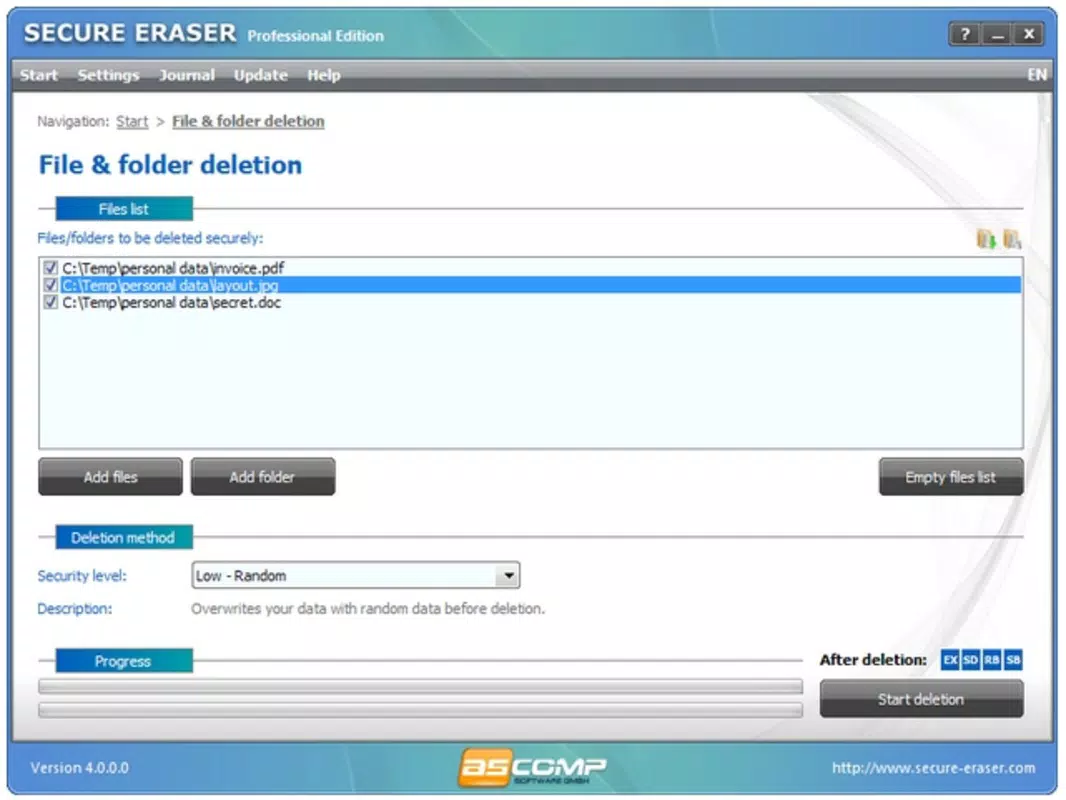
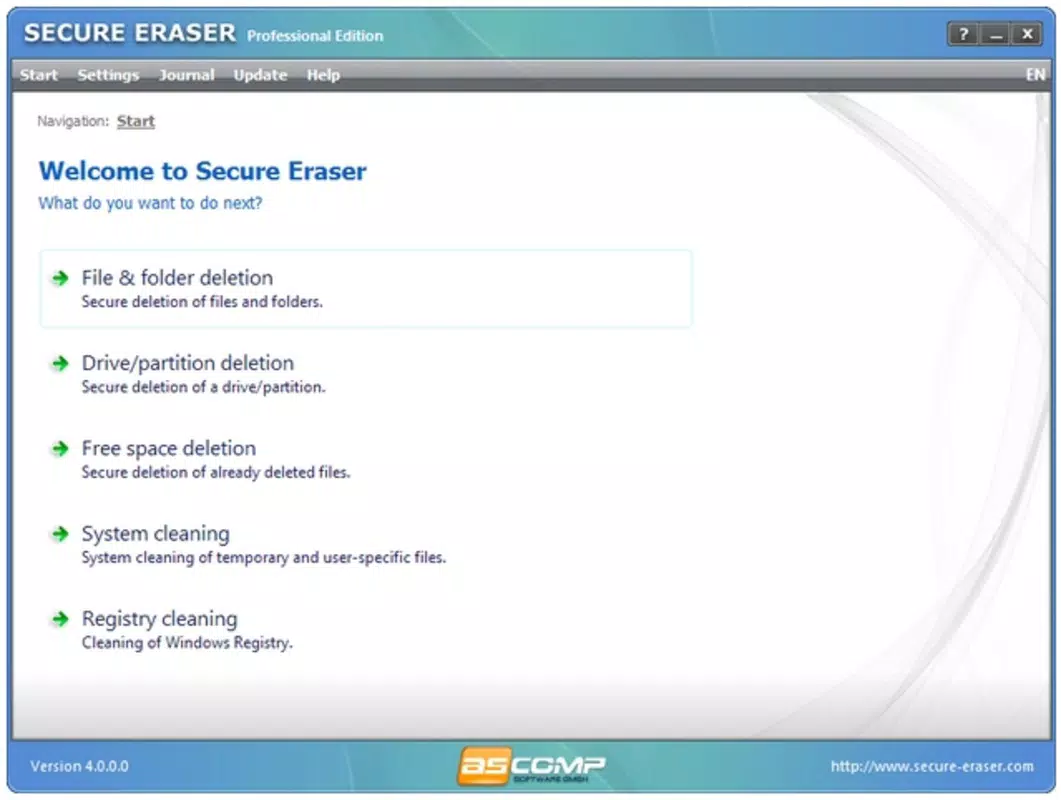
- Comprehensive File Deletion: Secure Eraser employs secure overwriting protocols to permanently erase individual files, ensuring that no data remnants remain on the storage drive. This process prevents recovery through standard or advanced forensic tools, making it ideal for sensitive file disposal.
- Free Space Cleaning: The app scans and securely wipes unused space on the hard drive, eliminating any traces of previously deleted files that may still exist in unallocated sectors. This feature is essential for users who want to ensure complete privacy after mass deletions.
- System Cleaner: By identifying and removing temporary files, cache data, and other non-essential system clutter, Secure Eraser helps improve overall system responsiveness and frees up disk space, contributing to better performance.
- Registry Cleaner: This tool targets invalid or obsolete entries in the Windows registry, helping to prevent system slowdowns and potential errors caused by corrupted or outdated configurations.
- Multiple Deletion Methods: Users can select from various wiping standards, each offering different levels of security and processing times. This flexibility allows users to balance speed and safety based on their specific needs, from quick removals to military-grade erasure.
For example, a user preparing to sell a laptop can use the “Secure Erase” mode to wipe all personal files and then run the free space cleaner to eliminate any leftover fragments. Similarly, IT administrators may use the registry cleaner to maintain system health across multiple workstations, ensuring consistent performance and stability.
Interface, UX & Performance
Secure Eraser presents a clean, intuitive interface designed for both novice and experienced users. The layout organizes core functions—file deletion, free space cleaning, system cleanup, and registry maintenance—into clearly labeled sections, enabling straightforward navigation. Visual cues and progress indicators help users track ongoing operations, enhancing transparency during time-consuming tasks like secure wiping.
Navigation is linear and consistent, with minimal steps required to initiate a deletion or cleanup process. The app’s responsiveness is generally strong across standard Windows configurations, although performance may vary depending on drive type (HDD vs. SSD) and system load. Although the developer did not list formal performance metrics, the interface remains stable during prolonged operations, with no reported crashes or freezes in typical usage scenarios.
While specific device compatibility details were not disclosed, the application is optimized for the Windows platform and functions reliably on modern systems. Users can expect consistent behavior during file erasure and system optimization tasks, with minimal impact on background processes. The overall user experience reflects a focus on clarity, control, and reliability—key attributes for a privacy-sensitive tool.
Platform Compatibility & Technical Requirements
Secure Eraser is available exclusively for the Windows operating system. The current version, 1.5.2, has a file size of 25.8 MB, indicating a lightweight installation footprint suitable for most Windows devices. The app is compatible with current and widely used versions of Windows, though specific minimum OS requirements were not listed by the developer.
Given the application’s focus on low-level disk operations and system-level access, it likely requires elevated permissions to function properly. However, the developer did not provide explicit information about required system specifications, such as RAM, processor speed, or disk space beyond the installed size. Users are advised to ensure their system meets general Windows compatibility standards for running third-party utilities.
As the app is not available on mobile platforms, it is intended for desktop and laptop use. The release date of April 21, 2025, suggests a recent update, reflecting ongoing development and support for current Windows environments.
Pros and Cons
- Offers multiple secure deletion methods for customizable privacy levels
- Includes free space cleaning to eliminate residual data traces
- Enhances system performance with built-in cleanup tools
- Registry cleaner helps maintain system stability
- Designed for permanent, irreversible file removal
- Price point of $19.99 may be considered high for casual users
- No mobile version available for on-the-go data management
- Specific system requirements were not disclosed
- Windows-only platform limits cross-device accessibility
- Advanced features may overwhelm less tech-savvy users
FAQ
Is Secure Eraser safe to use on my Windows system?
Yes, Secure Eraser is designed to operate safely on Windows systems. It uses standard Windows APIs and requires appropriate permissions to perform disk and registry operations. As with any system-level tool, users should ensure they are deleting only files they intend to remove permanently.
Can I recover files after using Secure Eraser?
No. Once a file is erased using Secure Eraser with a secure method, it cannot be recovered using standard or advanced data recovery tools. The app overwrites data multiple times to ensure complete irreversibility.
Does Secure Eraser work on SSDs?
Secure Eraser is compatible with SSDs, though the effectiveness of certain wiping methods may vary due to the different architecture of solid-state drives. The app includes options suitable for SSDs to avoid unnecessary wear.
How often should I use the system cleaner and registry cleaner?
These tools can be used periodically—such as monthly or quarterly—to maintain system performance. Frequent use is not necessary unless the system shows signs of slowdown or clutter accumulation.
Is Secure Eraser available for Android or iOS?
No. Secure Eraser is designed exclusively for Windows and is not available on mobile platforms. Users seeking similar functionality on smartphones should explore alternative tools tailored to mobile operating systems.
Final Thoughts
Secure Eraser stands out as a dependable utility for users who prioritize data privacy and system cleanliness on Windows. Its ability to permanently erase files, clean free space, and maintain system health makes it a valuable addition to any digital toolkit. While the $19.99 price may deter casual users, professionals, IT administrators, and privacy-conscious individuals will find its features justify the cost.
For anyone preparing a device for sale, retiring old systems, or managing sensitive information, Secure Eraser delivers on its core promise: irreversible data removal. Its blend of security, functionality, and reliability positions it as a trusted tool in the productivity and privacy space.
Download Secure Eraser now


